
Patient Gateway
Mass General Brigham, IncMedical
4.41.23K Reviews
- Version
- 11.5.100
- Installs
- 100.00K
- Age Rating
- Everyone
Screenshots
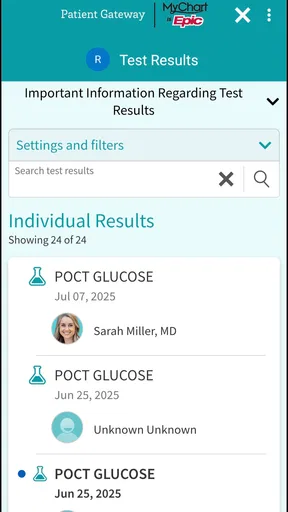
Our Review of Patient Gateway
 Analysis by Appyee
Patient Gateway is the kind of medical app I open with a specific task in mind rather than browse for entertainment. It is designed for patients who want to view health information and communicate with their doctor, and that focused purpose makes it easier to judge than a broad wellness app. In my experience, its value depends less on flashy design and more on whether it helps me handle routine healthcare jobs without reaching for a phone or waiting for an office response.
Developed by Mass General Brigham, Inc, this free app sits in the medical category and is suitable for everyone. It has built a solid audience, with over 100 thousand installs, an average rating of 4.4, and around 2.5 thousand ratings. Those figures suggest that many people find it useful for ongoing contact with their healthcare team, although a rating alone cannot tell me whether it fits every clinic or every patient’s habits.
How Patient Gateway feels in everyday use
I find Patient Gateway most useful when I treat it as a quiet workspace for a specific healthcare task, not as a live chat or a place to keep checking for updates. That distinction helps me decide what belongs in a message and what needs a faster route. It also makes the next question more important: how much confidence can I reasonably place in the app’s trust and privacy choices?
A focused starting point for health-related tasks
The first thing I appreciate is the narrow purpose. Patient Gateway is not trying to replace a general health tracker, a symptom-search website, or an emergency service. It is meant to bring selected patient information and doctor communication into one place. That distinction matters because it sets the right expectation: I use it to manage an existing connection with a healthcare provider, not to diagnose myself or receive immediate emergency help.
A realistic use case is preparing for a regular appointment. Instead of relying on memory, I can use the app as a place to review available health information before the visit and organize what I want to ask. Afterward, communication with the doctor can be handled through the same patient-facing channel when that is appropriate. This is more practical than keeping scattered notes in email, text messages, and paper documents.
The biggest strength is continuity: health information and doctor communication are brought into the same patient workflow. That can reduce the small amount of friction that often causes people to postpone non-urgent questions. It is especially useful for someone managing recurring appointments, follow-up discussions, or several details that are easy to forget between visits.
Speed expectations: useful when the task is simple
I would describe the app’s performance expectations as task-oriented rather than instant-service oriented. When I open a medical portal, I usually want to check one item, read a message, or review information before deciding what to do next. Patient Gateway makes sense for those short sessions. It is not an app I would expect to keep open continuously, and it does not need to be.
The perceived speed of any patient portal depends on more than the application itself. Information has to come from the healthcare organization’s systems, and communication may depend on staff availability. A screen that takes time to update is not necessarily a sign that the app is poorly built; it may reflect the difference between opening a local app and requesting current medical information from a connected service. I keep that distinction in mind when judging responsiveness.
For the smoothest experience, I would open the app when I have a stable connection and a clear goal. I also avoid treating a delayed response as a reason to keep tapping the same control repeatedly. In a medical portal, repeated attempts can create confusion about whether a request was sent. A calmer workflow is to check the screen carefully, allow the action to complete, and then verify the resulting status before trying again.
What happens during heavier use
Patient Gateway becomes more demanding during moments when I am doing several related tasks in one sitting. For example, before an appointment, I might review health information, read an earlier conversation, and prepare a new message. That kind of session is more involved than simply opening the app to look at one item, so organization matters as much as raw speed.
My practical advice is to split a complicated visit-preparation session into clear steps. First, review the information already available. Next, write down questions separately so the message remains focused. Finally, reread the message before sending it. This is not merely an efficiency trick. It helps prevent a long, unclear note from mixing several unrelated concerns and makes it easier for the recipient to understand what needs attention.
Another useful habit is to avoid using the portal as a live conversation tool. A message to a doctor should be treated as a non-urgent communication channel, not as a replacement for emergency assistance. If a situation feels urgent or dangerous, I would use the appropriate immediate-care option instead of waiting for an app-based reply. That is an important boundary for any medical communication app.
People who manage information for a family member may also need to think carefully about whose account they are using and whose health information they are viewing. The app’s usefulness depends on having the correct patient context in front of me. Before sending anything, I would check the displayed account and recipient details, particularly after switching between sessions or using a shared device.
Reliability is more than avoiding crashes
For this type of app, reliability means more than whether it opens without closing unexpectedly. I also want confidence that I am looking at the right information, that a message has been handled correctly, and that I understand whether an action is complete. Patient Gateway is valuable when it provides a dependable bridge to an existing healthcare relationship, but the overall experience can still be affected by network conditions and the connected provider system.
I would not use a portal as my only place to keep critical medical details. If a doctor has given me an important instruction, I make sure I understand it and retain it in a way that works for me rather than assuming I can always retrieve it immediately. The app is best used as a convenient access point, not as a substitute for personal responsibility in managing health information.
There is also a human side to reliability. Messages can be sent successfully without receiving an immediate answer, because the healthcare team may need time to review them. That is normal for asynchronous communication, but it can feel like a problem if I expect chat-like behavior. Patient Gateway works better when I use it for questions that can wait and reserve phone or urgent services for matters that cannot.
Device constraints and practical comfort
The listed minimum operating-system requirement is Android 9, and the current version is 11.5.100. That makes the app relevant to many reasonably current Android phones, while owners of older devices should check compatibility before planning to depend on it. A medical portal does not need to be graphically demanding, but a device that struggles with modern applications can still make sign-in, scrolling, or text entry less comfortable.
I find a larger screen helpful when reviewing longer health information or carefully checking a message before sending it. On a small phone, dense medical text can be tiring, and it is easier to overlook a detail when scrolling quickly. This is one situation where a browser-based patient portal or another larger-screen option may feel more comfortable, if the healthcare organization provides one. The app is more convenient for quick access, while a larger display can be better for careful reading.
Battery and storage demands are not the main reason to choose or reject this app. Its job is focused, and I would not expect it to be used like a streaming or gaming application. The more important device constraints are practical: the operating system must be supported, the phone must allow comfortable text entry, and the connection must be dependable enough to retrieve current information.
I would also be cautious on a shared or borrowed phone. Medical information deserves the same care as other private records. I avoid leaving an account open, review the screen before handing the device to someone else, and use the phone’s own security options. These are sensible habits regardless of the app, but they matter more when the application connects me with personal healthcare information.
Where it fits beside the usual alternatives
The main alternatives are usually a healthcare organization’s website, a phone call, email, or a general health-record application. Patient Gateway’s advantage over a phone call is convenience for routine communication: I can review information or compose a question without waiting on hold. Compared with ordinary email, a dedicated patient portal feels more appropriate for healthcare-related communication because it keeps the interaction tied to the patient relationship rather than mixing it with a personal inbox.
A website may be preferable when I am working on a computer, reading a substantial amount of information, or entering a long message. The app is more natural when I need access while away from a desk. I would choose a general health app for tracking habits, exercise, or personal measurements, but not expect it to provide the same connection to my doctor. These tools solve different problems, and Patient Gateway is strongest when the task involves the provider relationship itself.
There is one important trade-off: a portal is only as useful as the healthcare connection behind it. Someone whose doctors do not use the service, or who wants a universal record that combines unrelated providers, may find a broader solution more suitable. Patient Gateway is not the right choice simply because it is a medical app; it is the right choice when it matches the organization and care relationship I need to manage.
Small workflow choices that make it more useful
I get more from the app when I treat it as part of an appointment routine rather than a place to wander. Before a visit, I review what is available and keep my questions concise. After a visit, I use the information as a reference for what I understood, while contacting the appropriate healthcare professional if something remains unclear. This approach keeps the app useful without expecting it to interpret medical information for me.
When writing to a doctor, I put the main question near the beginning and separate different concerns into readable paragraphs. I include enough context to make the question understandable, but I avoid turning one message into a complete personal history. This makes the communication easier to follow and helps me notice whether I am asking for information, requesting clarification, or reporting a change that may need a different route.
I also recommend checking the destination before sending a message. In a portal connected to healthcare services, selecting the wrong conversation or recipient could create unnecessary delays. Taking a few seconds to confirm the patient context, subject, and wording is a better habit than assuming the app will correct every mistake.
For people who frequently move between mobile devices, keeping a consistent sign-in routine is worthwhile. I would avoid relying on memory alone for important account details, and I would not assume that reinstalling an app is a harmless first step if I am in the middle of a healthcare task. If something appears missing or unusual, I would pause and verify the account and connection rather than immediately concluding that the information has disappeared.
Who will benefit most from it
Patient Gateway is a good fit for patients who already have access through a participating healthcare relationship and want a more convenient way to view health information and communicate with their doctor. It is particularly practical for people who dislike phone queues, prefer written communication for non-urgent questions, or want to review information before an appointment instead of trying to remember everything during a short visit.
It can also suit people who are comfortable managing their own digital healthcare tasks. The app rewards a careful user who checks details, writes clearly, and understands the difference between a portal message and urgent care. Someone who expects immediate replies, instant diagnosis, or a complete personal health-management system may be disappointed.
I would skip it as a primary solution if I need emergency assistance, if my main goal is fitness tracking, or if I want one independent app to combine every provider and health record automatically. In those situations, emergency services, a specialist tool, a provider website, or a broader record-management option may be more appropriate. The app’s focused design is a benefit only when the focus matches the job.
My performance verdict after weighing convenience and friction
Patient Gateway succeeds because it addresses a real everyday problem: keeping contact with a doctor and reviewing health information without making every small task a phone call. Its performance is best understood as dependable access for short, purposeful sessions rather than entertainment-style speed. When the connection is available and the healthcare workflow matches the app, it can make preparation and follow-up feel more organized.
The limitations are equally clear. It is not an emergency channel, not a diagnosis tool, and not a universal replacement for every healthcare website or phone service. Delays may come from the connected medical system or the response process rather than the handset, and a small screen can make detailed reading less comfortable. Those are not reasons to dismiss it, but they are reasons to use it with realistic expectations.
With a free price and an Everyone age rating, it is easy to consider for eligible patients, and its established presence on Android gives it a practical level of familiarity. I would recommend trying it if my healthcare provider uses Patient Gateway and I want a direct, organized route to health information and doctor communication. I would keep another option available for urgent needs and use a larger screen when a message or record requires careful reading.
Overall, I see Patient Gateway as a useful companion to an existing care relationship, not a replacement for that relationship. Its strongest quality is the way it puts routine patient tasks into one focused place. If I approach it as a secure, non-urgent communication and information tool, the balance of convenience, device demands, and practical reliability makes it worth keeping available.
Verdict
Strengths of Patient Gateway
- Secure access to appointments, test results, and medical records in one place.
- Easy messaging with participating doctors and care teams.
- Prescription refill requests can save time between appointments.
- Appointment reminders help reduce the risk of missed visits.
- Supports family access for managing dependents’ healthcare information.
Limitations of Patient Gateway
- Features depend on whether your healthcare provider uses Patient Gateway.
- Some test results may appear before a doctor has explained them.
- Response times to messages can vary by clinic and provider.
- Account setup may require identity verification and personal details.
- The app may feel limited for users needing broader health-tracking tools.
Similar Picks in This Category
View All
WebMD: Symptom Checker
WebMD, LLC4.1

Microphone Amplifier
DOSA Apps4.2

Anatomy Learning - 3D Anatomy
3D Medical OU4.5

Period Tracker and Calendar
SimpleInnovation4.9

GoodRx: Prescription Coupons
GoodRx4.8

CVS Health
CVS Pharmacy4.5
Frequently Asked Questions
What is Patient Gateway used for?
Patient Gateway is a secure patient portal that lets you manage many healthcare tasks online. Depending on your healthcare organization, you may be able to view medical records, review test results, request prescription refills, send messages to your care team, schedule or manage appointments, and check billing information. Available features can vary by provider, location, and account permissions.
How do I create or activate a Patient Gateway account?
To use Patient Gateway, you generally need to register through a participating healthcare provider or receive an invitation with an activation process. You may be asked to verify personal information, create a username and strong password, and complete additional identity checks. If you have trouble registering, cannot find an invitation, or your information is not recognized, contact your provider’s office rather than creating multiple accounts.
Is Patient Gateway safe for viewing medical information?
Patient Gateway is designed to provide secure access to personal health information using account authentication and encrypted connections. However, your own device and login habits also affect privacy. Use a unique password, enable any available security verification, keep the app updated, and avoid signing in on shared or public devices. Always log out when finished and contact support immediately if you notice suspicious activity.
Can I use Patient Gateway to communicate with my doctor or request care?
Many participating providers allow patients to send non-urgent messages to their healthcare team through Patient Gateway. You may also be able to request appointments, prescription refills, or referrals, but response times and available options depend on the practice. The messaging feature should not be used for emergencies or serious symptoms. For urgent medical concerns, call emergency services or follow your provider’s emergency instructions.
Why can’t I see all my records, test results, or appointments in Patient Gateway?
Patient Gateway does not always display every part of a medical record immediately or in the same way for every user. Information may depend on the healthcare organization, the type of visit, result-release policies, connected systems, or whether a record has been finalized. If something appears missing, delayed, or incorrect, contact the relevant provider’s office. App availability and features may also differ between Android and iOS.
